History will remember 2020 as the year music educators reinvented how to teach general music to young students. Whether in remote, hybrid, or f2f learning with restrictions, our students thrive on and need consistent classroom management based on routines.
History will remember 2020 as the year music educators reinvented how to teach general music to young students.
We are teaching remotely or in hybrid to face-to-face (f2f) with restrictions. Most music educators have had to adapt to a unique teaching scenario and be prepared at a moment’s notice to switch into a different teaching model. Technology, once a passive tool an elementary music teacher used intermittently, has become one of our primary teaching vehicles.
With younger elementary students, how can we engage them without promoting too much screen time? How can we actively make music with restrictions preventing traditional music teaching methods?
This article will provide you with some ideas to create a cohesive classroom environment in your current teaching scenario. For additional information on integrating technology into elementary music, please check out Using Technology with Elementary Music Approaches (Oxford University Press, 2020).
Maintaining a Classroom Routine
Before distance learning, we had established routines for our young elementary music students. Following various valuable and practical curriculum approaches (see the list below), we had a daily routine for students. These routines involved activities like a welcome song, a vocal warmup, singing numerous songs, and dispersing movement and instrument play-along activities throughout the lesson.
Dr. Feierabend’s First Steps in Music for Preschool and Beyond (GIA Publications, 2006)
Whether in remote, hybrid, or f2f learning with restrictions, our students still thrive on and need consistent classroom management based on routines (Davis, 2018; Mileski, 2017; Peresta, 2018). Regardless if we are teaching synchronously online, live in-person with numerous restrictions, or asynchronously, our classroom routines need to become a digital, visual version of its former self.
Creating a Digital Routine
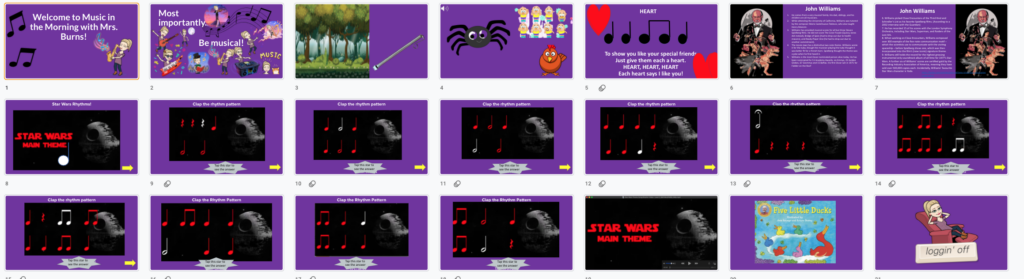
Slide Decks are an excellent way to reinforce the routine. Keynote and PowerPoint software app’s are more robust than Google Slides. However, Google Slides are used more frequently because it is free, can be used on multiple devices and platforms, and shared intuitively, especially with students using school-issued Chromebooks.
Creating a slide deck that shows the classroom routine is beneficial for younger students. I recommend using consistent slides for each music class. Helping in-person students, students who login to the class remotely, and students who will review the lesson later asynchronously.
My slide deck includes the following:
Welcome slide
Review of classroom rules slide (especially if we are using Zoom/Meet/Teams, so the students and caregivers know when to mute and when to unmute)
How are you feeling slide (mine has various music Bitmojis that they emulate the musical pose to let me know how they are feeling)
Vocal warmup slide (in-person, we hum this slide)
Simple song slide (in-person, we hum this slide, and online, we mute to sing as it becomes “a mess when we sing together online,” as one of my students described it)
Listening to and reflecting on music slide (this contains a listening sample and guided questions)
Movement activity slide
Steady beat or rhythm reading activity slide
Rhythm play-along activity slide
Movement activity slide
Songtale slide (this contains a video of myself singing a songtale or a YouTube link of a songtale that embeds directly into the slide)
Pear Deck is a google slide add-on. Pear Deck allows students to join your slide deck (with or without email addresses). Additionally, you can add questions and activities for them to perform during the lesson. You will receive their responses live, as well as after the lesson is complete. The paid version gives your students more tools to use, such as drag-and-drop and drawing tools.
Mileski, A. (2017, August 22). Opening & Closing Routines in the Elementary Music Classroom {Sparkle & Shine BTS PT 2}. Retrieved November 14, 2020, from https://anacrusic.com/bts-series-opening-routines/
Peresta, J. (2018, May 16). Clear Expectations: What Procedures to Practice in the Elementary Music Classroom. Retrieved November 14, 2020, from https://nafme.org/clear-expectations-what-procedures-to-practice-in-the-elementary-music-classroom/
Amy M Burns has taught elementary general music for over 20 years at Far Hills Country Day School, a preschool through grade eight school in NJ. Amy earned her Bachelor’s of Music Education and Performance from Ithaca College and her Master’s of Science…




 Facebook
 Twitter
 Pinterest
 LinkedIn
 Email
Email Print
Print