SUMMMARY
Adapting music instruction to a virtual platform has created many challenges for educators. Here are some tips & tricks to help you bring engaging, interactive ukulele instruction to students virtually!
by Emily Arrow





Adapting music instruction to a virtual platform has created many challenges for educators. Here are some tips & tricks to help you bring engaging, interactive ukulele instruction to students virtually!
by Emily Arrow
In 2020, I taught over two hundred students to play ukulele online through live, interactive group classes. I teach learners ages 4-12 using the curriculum I created, Kids’ Guide To Learning the Ukulele (2020, Fox Chapel Publishing). I began this approach to ukulele instruction after spending three years in the classroom as a K-6 elementary music teacher, followed by touring the country as a ukulele-based songwriter for young people.
Yet, I must admit: on my first day of virtual ukulele teaching, I had a stomach full of worry. My mind was racing with questions like, how will we all play our ukuleles simultaneously? When should my students turn their microphones on and off? Will my ukulele look backward to my students?
What did I discover? Yes, your ukulele will look backward (but it has turned out to be no big deal!), and the ability for students to turn on and off their microphones has only helped my learners grow–more on that below.
Over time, I’ve uncovered some helpful tips and tricks for teaching ukulele virtually that I hope will educate and support your virtual teaching practice as well. I’ve also made the surprising discovery that I find so much joy and inspiration while teaching music virtually, and I hope you will too.
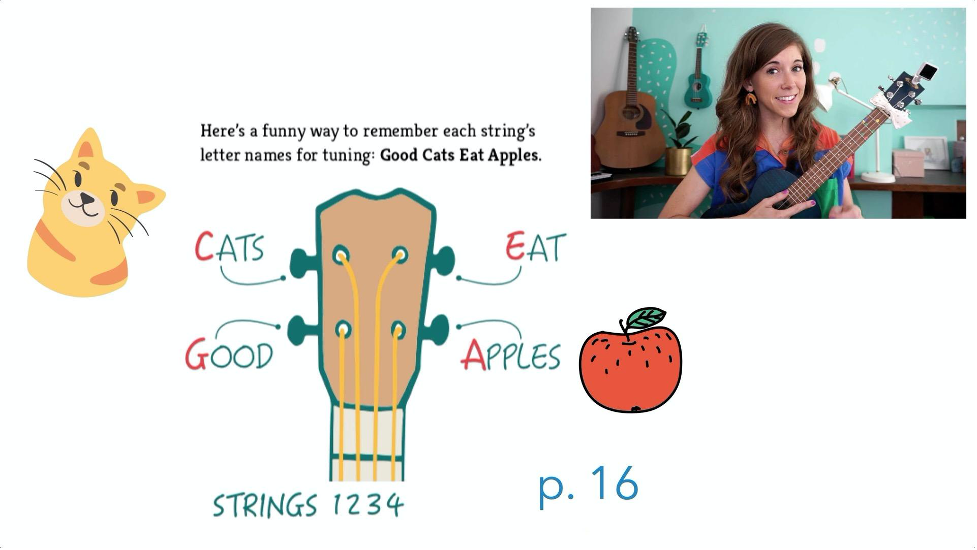
I created a tuning video to send to the supporting adult in advance of our classes. Feel free to use my video (linked below) as a resource, or you could create your own! I also recommend adding the free Kala Ukulele tuning app to a device my students can use. This flipped-classroom approach will save you lots of time at the beginning of each class!
Kala Tuning App I recommend: https://apps.apple.com/us/app/kala-ukulele-songbook-tuner/id1064893690
Because learners aren’t all in the same physical space, they won’t notice the sound of another student’s ukulele strumming. Use this to your advantage!
Ask students to play along anytime another student is sharing solo. You’ll be impressed (and inspired) by how quickly students discover mastery of skills simply because they’ve been playing their ukulele for the entire class time.
Learning music virtually doesn’t mean we can’t still practice valuable performance skills! Instead of asking each student to share something weekly for assessment, I like to schedule Song Shares every four weeks(ish).
For guidance, I give students a choice between two or three songs to prepare together as a group. In my virtual learning spaces, sharing a song is always optional, and I give learners a choice of sharing a fun fact about music instead.
Sometimes students enjoy “dressing up” in costumes on Song Share day, and I even downloaded a curtain with a drumroll video that I share on my screen before each performance. Like in-person instruction, remember to discuss and support learners through performance anxiety, teaching breathwork tools, and offering positive feedback.
Before each class, I take a deep breath and repeat this intention aloud: “I am a present, flexible teacher. My job is to inspire my students to love music and find new ways to grow.”
Consider setting a similar intention or customizing this to make it your own. It can be challenging to teach a musical instrument through the screen, so be gentle with yourself and your students about everyone’s progress.
I believe an extraordinary part of teaching virtually is that we can still experience emotions through the screen. Let self-compassion be part of your repertoire, and watch how your students grow musically and emotionally within the space you have the opportunity to create.
To learn more about my work and find more resources for virtual teaching, you can visit www.EmilyArrow.com.

This article was originally published by Music Constructed on June 3, 2021.

Contributor
Author Emily Arrow is an award-winning children’s songwriter and author of the multiple books for young people including Studio: A Place for Art to Start (Tundra Books) and The Kids’ Guide to Learning the Ukulele (Fox Chapel Publishing). Emily’s…
Discover more from Emily Facebook
 Twitter
 Pinterest
 LinkedIn
 Email
Email Print
Print