SUMMARY
Consider adding these three tech-friendly collaboration tools as we move back to in-person learning. They are an easy way for students to show and share their work instantly!
by Calyanne Crouch




Consider adding these three tech-friendly collaboration tools as we move back to in-person learning. They are an easy way for students to show and share their work instantly!
by Calyanne Crouch
After 15 months of distance music education for many of us, we look toward the 2021-2022 school year with a much-needed fresh set of eyes. We know that the education world has changed permanently, and 1-to-1 technology has become prevalent, if not the standard, even at the elementary level. Virtual collaboration has been and will continue to be a lifeline to many students, especially those intimidated or feeling shy by returning to in-person learning.
While I cannot wait to be back in my own classroom with full use of our instruments, it would behoove me to continue using these tech-friendly collaboration tools that make it easier for students to show and share their work instantly!
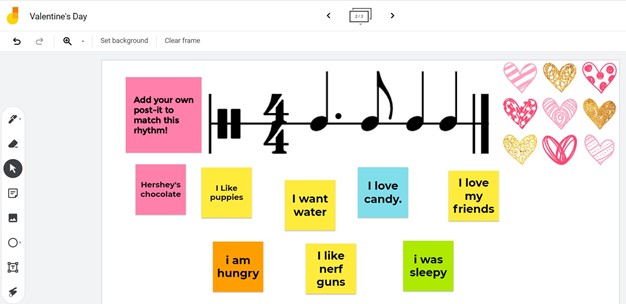
Google Jamboard is a collaborative digital whiteboard online service and app and shares a name with their interactive whiteboard physical product. The online version is free and accessible for anyone with a google account to create. It is super beneficial because students do not need an account to access and collaborate once their teacher has created it!
Students collaborate by adding drawings, text, images, or sticky notes to the board. My favorite use is to have students generate composition ideas by adding sticky notes to answer a question or task I have set at the top.
Pro Tips:
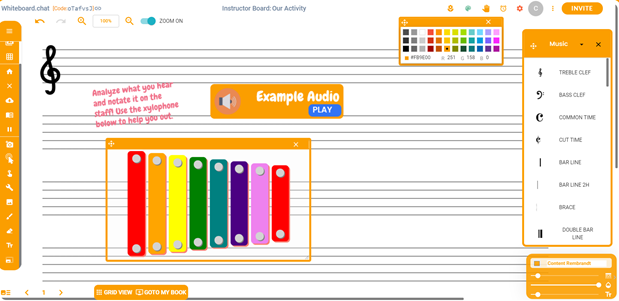
Another collaborative digital whiteboard tool, the massive advantage of Whiteboard.chat is the ability to add staff paper as the board’s background and insert notation from the manipulatives menu! There is no need to create an account to get started, but you can choose to save your boards.
Students join through a shared link, class code, or QR code, and the app is compatible with Google Classroom. Students can collaborate together on a board, or you can set it to generate a copy of your board for each student!
Boards generated for each student can also be assigned to each student for asynchronous work. Built-in timers, hand raising, chat, animations, pollings, and widgets such as spinners and dice increase functionality. Using the left-hand control panel to draw, insert text and media, and use special tools.
Pro Tips:
Padlet functions more like a virtual bulletin board than a whiteboard but is a wonderful collaboration tool. Use for generating ideas, sharing feelings and opinions in listening reflections, and creating group resources when exploring instrument families, genres, and notable composers and performers.
It’s also a great way to review expectations and guidelines for classroom procedures or concert planning. Popular uses also include exit tickets, KWLs, and ice breakers! The free version of Padlet has some limitations, but there are individual and school-paid accounts available.
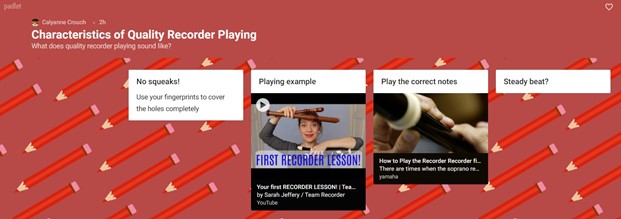
Pro Tips:
This article was originally published by Music ConstructED on August 19, 2021.

Contributor
Calyanne Crouch teaches 3-5th grade General Music and leads the Visual and Performing Arts team at the American School of Tegucigalpa, in Tegucigalpa, Honduras. She also coordinates the Houses system and directs the extracurricular Honor Choir program. Her percussion performance background…
Discover more from Calyanne Facebook
 Twitter
 Pinterest
 LinkedIn
 Email
Email Print
Print